
The "Max Number of Screens" setting limits the number of screen captures taken during auto-scroll.
Overview
During a full page capture, Forensic OSINT scrolls through the webpage and takes successive screen captures. The max number of screens setting controls how many captures will be taken before the process stops automatically.
The maximum value available depends on your subscription level and system capabilities. Higher values allow capturing longer pages but require more system resources.
Adjusting the Max Number of Screens
This setting can be found in the settings section, accessible via the settings icon.
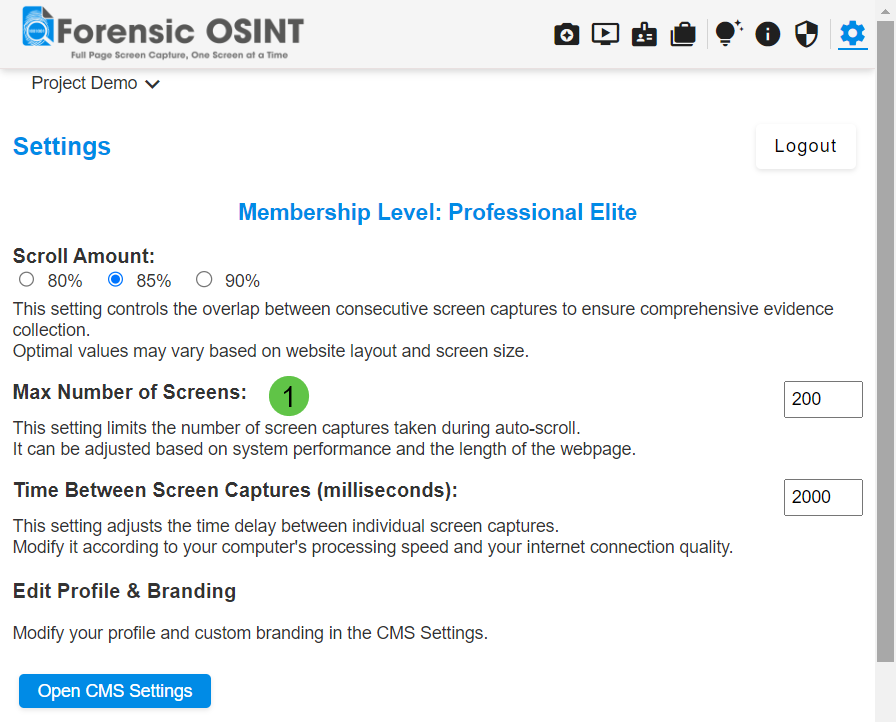
To adjust the max number of screens:
- Open Forensic OSINT: Launch the Forensic OSINT extension in your browser.
- Go to Settings: Click on the settings icon to open the settings menu.
- Adjust Max Number of Screens: Find the "Max Number of Screens" option and set it to the desired value. This value can range based on your subscription level and system capabilities.
Why Adjust the Max Number of Screens?
Adjusting this setting helps in capturing lengthy web pages without overloading your system.
It allows you to balance between thorough capture and system performance.
For very long pages, consider increasing this value. For quick captures or if your system has limited resources, a lower value will keep performance smooth.
