
The "Time Between Screen Captures" setting adjusts the delay between individual screen captures. This ensures content has time to fully load before the next capture is taken.
Why adjust this setting
Due to the dynamic nature of websites like Facebook, Instagram, and other social media platforms, content is constantly being loaded and unloaded as you scroll.
If you have a slow computer, internet connection, or a high-resolution monitor, you may need to adjust this value to ensure the content is properly loaded before capturing.
Tip: Dynamic websites that load content as you scroll (like social media feeds) benefit the most from a longer delay between captures.
Adjusting the setting
This setting can be found in the settings section, accessible via the settings icon.
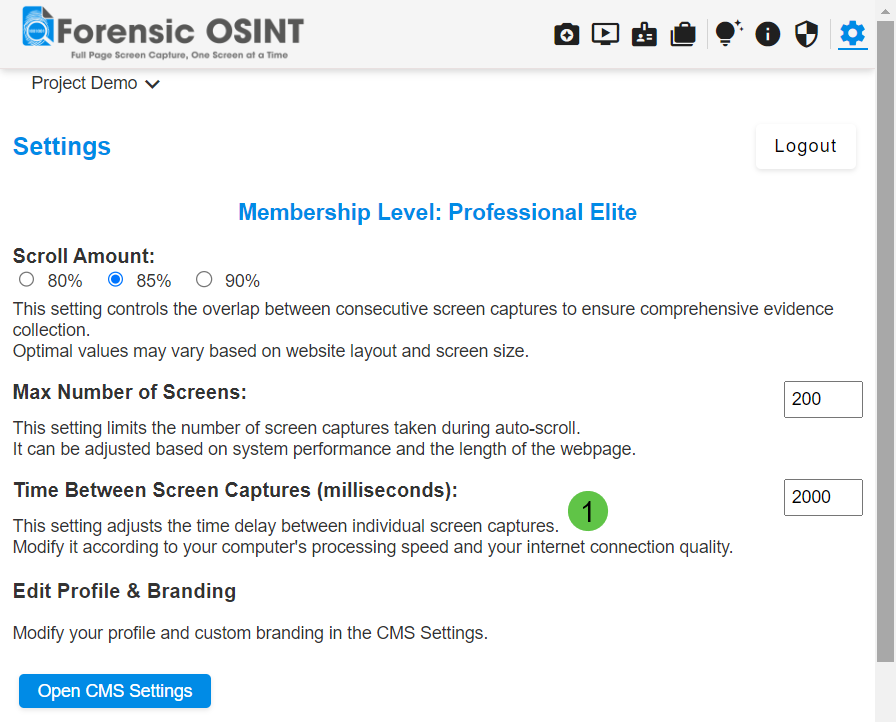
To adjust the time between screen captures:
- Open Forensic OSINT: Launch the Forensic OSINT extension in your browser.
- Go to Settings: Click on the settings icon to open the settings menu.
- Adjust Time Between Screen Captures: Find the "Time Between Screen Captures" option and set it to the desired value in milliseconds. Modify it according to your computer's processing speed and your internet connection quality.
When to adjust
Adjusting this setting helps ensure that the content is fully loaded before each capture, especially on dynamic sites where content changes frequently. This provides more accurate and comprehensive captures.
Tip: If you notice that some captures appear blank or show loading spinners, try increasing the time between captures to give the page more time to render.
Tip: For static websites that load quickly, you can decrease this value to speed up the capture process without sacrificing quality.
